1. Start with serving size.
Serving size tells you what the numbers are based on. If the label says one serving is 2/3 cup, the calories, sodium, fat, protein, and other nutrient values refer to that amount.
If you eat more or less than the listed serving, the nutrition totals change with the portion. That is why DailyLabel lets you adjust serving amounts before the food is added to the day.
2. Read calories in context.
Calories show energy from the serving. They are useful, but they are not the whole story. A label also shows nutrients that can matter for daily targets, including sodium, fiber, added sugars, protein, and fats.
3. Use percent Daily Value as a quick signal.
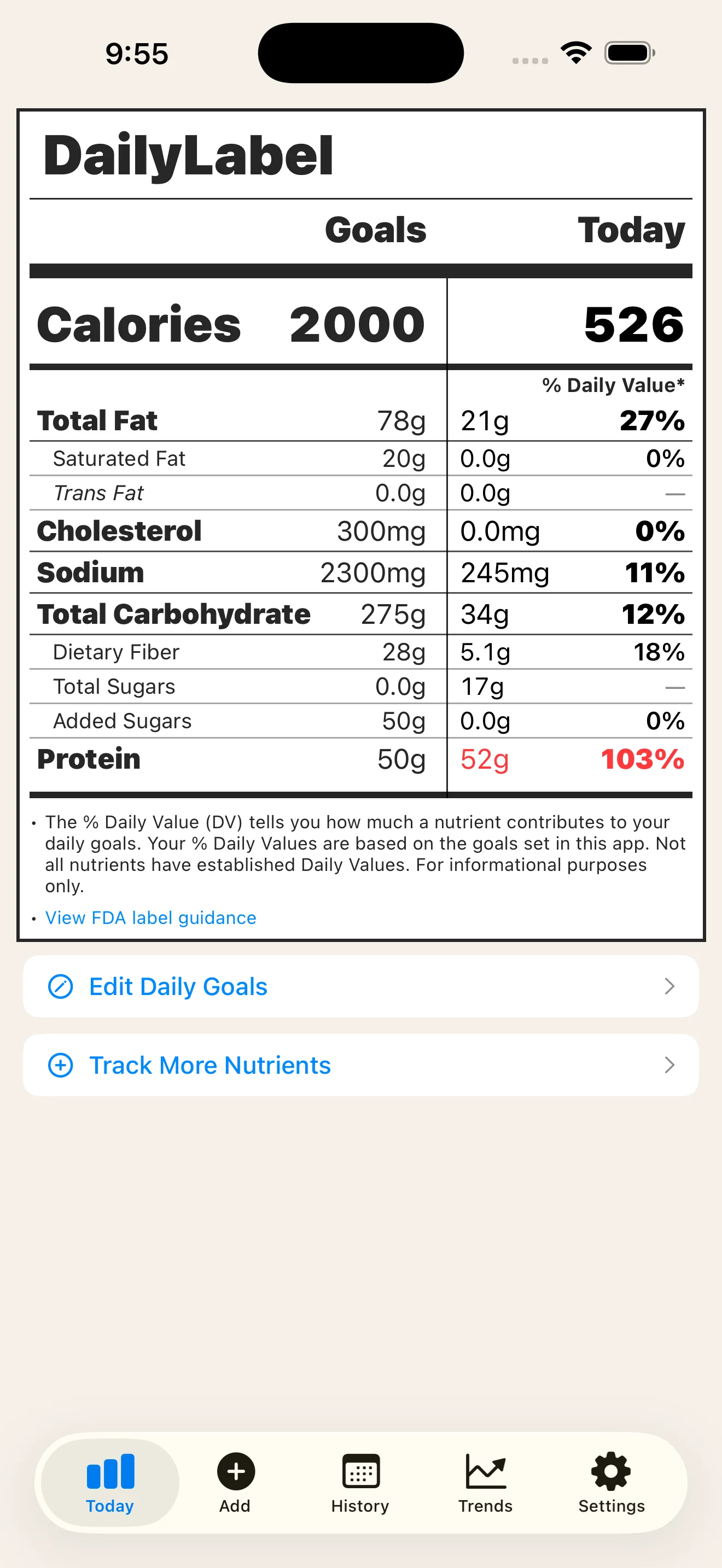
Percent Daily Value, often written as %DV, shows how much one serving contributes to a daily diet. On DailyLabel, the same idea is extended to your whole day so you can compare your goal, intake, and percent Daily Value in one place.
When a tracked DailyLabel value goes over its goal, the label uses red cues to make that item easier to notice.
4. Check ingredients and allergens.
Nutrition numbers tell one part of the story. Ingredients and allergen statements can explain what the food actually contains. DailyLabel shows ingredients, allergens, source badges, and food images when the data source provides them.
5. Use the label for the whole day.
A single packaged-food label is about one food. DailyLabel turns everything you log into a daily label, so keyword search, free barcode scanning, favorites, and custom foods all feed the same readout.